The Dos and Don’ts of Showing Pricing on Your Website
Showing pricing on your website can make it easier for potential customers to understand what you offer and decide whether it may be a good fit. But the way pricing is presented matters. A clear number with the right context can build confidence, while vague, incomplete, or outdated pricing can create confusion. The goal is not to publish every possible cost. It is to give people enough useful information to understand what they are considering and what the next step should be.
Do choose the right type of pricing
Not every business should show pricing in the same way. Use exact prices for fixed products, memberships, classes, or packages. Use starting prices when the cost changes based on the customer’s needs. A range may work better when most projects fall within a predictable window.
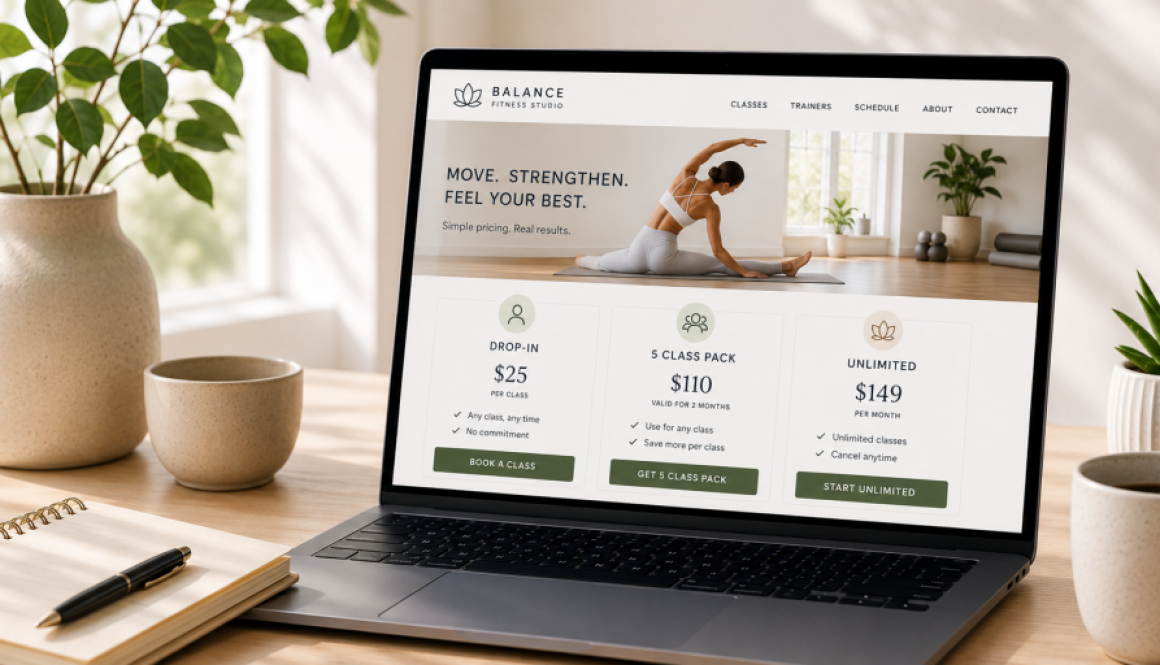
Example: A fitness studio can show exact prices for a single class, class package, and monthly membership. A house cleaning company may show a typical range based on the size of the home. A salon may use starting prices because the final cost can depend on the service requested.
Choose the format that gives customers useful guidance without promising a price that may not apply to them.
Don’t create false certainty
A fixed price can cause problems when the final cost depends on size, complexity, materials, timing, location, or customization. Someone may assume the advertised price applies to their situation, even when their needs require more time or resources.
Example: A photographer may offer a set price for a standard portrait session but provide custom quotes for weddings and large events. The website should make that distinction clear.
When the cost varies, explain what affects it. This helps customers understand why one service may cost more than another and reduces surprises later.
Do explain what the price includes
A price is more useful when customers know what they will receive. Include the main services, products, support, time, or access included with the offer.
Example: A fitness studio should explain how many classes are included, how long a class package remains valid, and whether unused classes carry over. A photographer should explain the session length, number of edited images, location limits, and delivery timeline.
This gives customers a fair way to compare options instead of comparing prices without understanding the differences.
Don’t hide important additional costs
Customers should not discover required fees after they have already decided to move forward. Be clear about deposits, setup fees, travel costs, supplies, required add ons, subscriptions, taxes, or other charges that may apply.
Example: A mobile beauty service may charge a travel fee outside its main service area. An event venue may have separate cleaning, security, or equipment fees. These costs do not always need to be included in the main price, but the website should explain that they may apply.
Clear expectations build trust and prevent uncomfortable conversations.
Do use pricing to improve inquiry quality
Pricing can help potential customers decide whether a service fits their budget before they contact the business. This can reduce inquiries from people who are far outside the normal price range and create more productive conversations with those who are prepared to move forward.
Example: A consultant might show the fixed price of a one-time strategy session and explain that ongoing support is quoted separately. A cleaning company might show a starting price for recurring service while asking customers to request a quote based on the home’s size and condition.
The purpose is not to discourage people. It is to help them reach out with a more realistic understanding of what the service may cost.
Don’t present price without context
Price should not be the only information customers see. Place it alongside the quality, experience, convenience, process, or results that support it.
Example: Two salons may charge different amounts for a color service, but one may include a detailed consultation, premium products, an additional treatment, and follow-up care. Without that context, a visitor may assume the services are identical and choose based on price alone.
Help customers understand what they are paying for and why the offer may be worth the investment.
Do make the next step clear
Once someone reviews the pricing, tell them exactly how to move forward. The next step may be purchasing a package, booking a class, scheduling a consultation, requesting a quote, or completing an intake form.
Example: A fitness studio could use buttons such as “Book a Class,” “Choose a Class Pack,” or “Start a Membership.” A photographer might use “Check Availability” or “Request a Custom Quote.”
The call to action should match the pricing option and make it clear what will happen next.
Don’t let pricing become outdated
Review your website whenever your prices, packages, fees, policies, or services change. Outdated pricing can create awkward conversations and make customers question whether the rest of the information on your website is accurate.
Example: A house cleaning company may still show an old starting rate that no longer reflects current labor or supply costs. Even a small difference can create confusion when someone is ready to request service.
Make pricing updates part of your regular website maintenance. Check package details, starting prices, additional fees, expiration dates, and promotional offers so the website always matches what the customer will actually pay.
Pricing works best when it helps people make a more informed decision. That may mean showing an exact price, a starting point, a range, or explaining why a custom quote is needed.
Whatever approach you choose, make sure the price is current, the details are clear, and the value is easy to understand. When those pieces are in place, pricing can help attract better fit inquiries and create smoother conversations from the start.